Agents
The Agents page lists the agent sessions connected right now, and is where you talk to them.
Open it from the sidebar, or press g then a.
The list
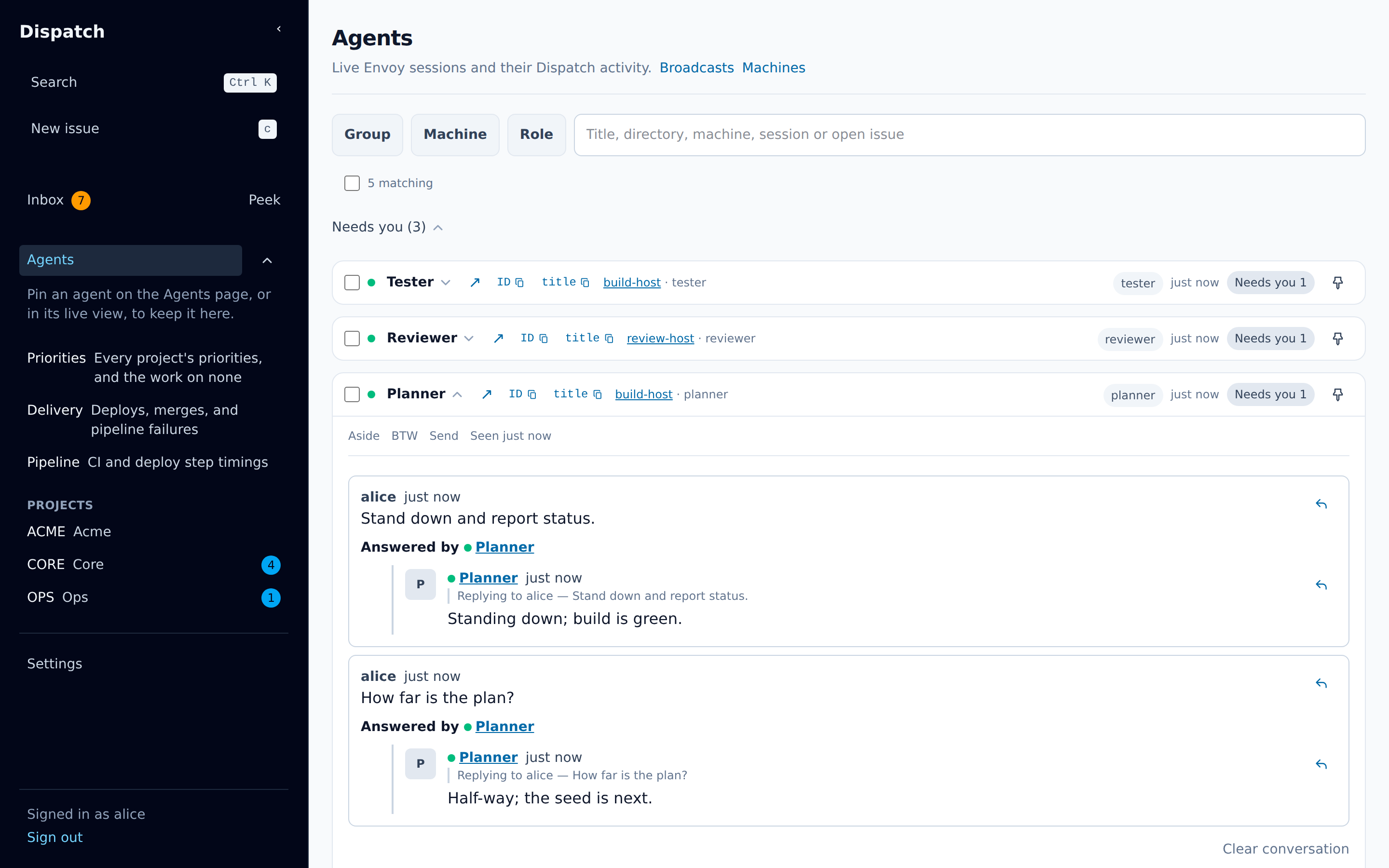
Section titled “The list”Each row is one agent session. It shows:
- its running mark: a filled dot while Dispatch lists it as running; point at the dot to see when the session was last seen,
- the session’s title and when it was last active in Dispatch, with a link beside the title, ↗, that opens its live view,
- the machine it runs on, which links to that machine’s page, and its directory; from a laptop width the directory is shortened to its last segment, with the whole path shown when you point at it, and on a phone it takes a line of its own and is shown whole,
- Needs you N when it has open asks whose next move is yours — the ones that wait on you — which opens your Inbox filtered to them,
- Waiting on agent N when it has asks whose next move is its own, on anybody’s issue; it opens the Inbox with the assignee filter cleared — that session’s whole open list, both sides of the turn, so nothing it counted is hidden by who holds the issue,
- a count of its replies you have not read,
- a pin, and a checkbox for broadcasts.
The page draws the rows the screen holds and twelve either side, so hundreds of sessions open as quickly as three. A row you have opened stays drawn however far you scroll away from it, and keeps what you were writing in it.
Groups
Section titled “Groups”Every listed session is in one of four groups, and the first of these rules that fits decides which:
- Needs you — it has an ask waiting on your answer, or a reply you have not read.
- Active — it wrote something in Dispatch within the last two minutes.
- Idle — it was last heard from within the last ten minutes. A session Dispatch has never heard from is here.
- Quiet — nothing has been heard from it for ten minutes or longer.
Because the first rule wins, a session silent for an hour that has a question waiting on you is in Needs you, not Quiet.
Each group is a heading carrying its count, Active (3), and Active (3, 1 selected) once a
broadcast has one of its rows ticked. Choosing the heading folds the group away,
and choosing it again opens it; a group that holds nothing is still shown, so the four states are
always on the page. Every group is open when the page loads, and a fold you make lasts while you
stay on the page.
A pin does not take a row out of its group. It orders that group’s own rows: pinned first.
Below the four groups, Replied, no longer connected holds the sessions that answered you and have since disconnected.
Filters
Section titled “Filters”Above the list, three filters narrow it — Group, Machine and Role — with a search box beside them. Each filter opens a list you tick as many entries in as you like, and each list has a box that narrows its own entries, so one machine among forty is found by typing rather than by reading. A session is kept when its group is among the ticked groups, its machine is among the ticked machines, and it holds at least one of the ticked roles; a filter with nothing ticked narrows nothing.
Typing in the search box keeps the sessions whose title, directory, machine, session id, or the
key of an issue one of its open asks names, together hold every word typed, in any order and
case; pressing / anywhere on the page focuses the box. A non-empty search opens every group, so
a match folded away in one of them still shows; clearing the search returns each group to the
state you left it in. The search box and the machine filter survive a reload through the page’s
address.
Pinned agents in the sidebar
Section titled “Pinned agents in the sidebar”The sidebar’s Agents heading folds, and under it are the agents you have pinned, oldest pin
first. Each row shows the session’s running mark and name, how many of its replies you have not
read, what its live view is doing — live, live 30s or asleep — and a
control that unpins it. With nothing pinned, the list says where to make a pin.
A pin is yours, not this browser’s. Pin an agent on its row on this page, or in its live view, and it is in the sidebar of every browser you are signed in on, with no reload. Pins a browser kept for you before are moved over once, the first time you load Dispatch in it.
Sending to one agent
Section titled “Sending to one agent”Choose an agent’s title to open its row. The row shows your recent exchanges with that agent and a message box.
By default the message goes straight to the agent, on no issue. Choose Choose issue to file it on an open issue instead; it is then posted on that issue as a comment that mentions the agent.
Press Ctrl+Enter (⌘Enter on a Mac) to send.
A message straight to the agent that Dispatch has not confirmed after 30 seconds says Still sending — Dispatch has not confirmed it yet. It keeps trying, and the message is delivered once. The page keeps sending it under one key, so however many tries reach Dispatch, the agent gets the message once, and it keeps trying while your connection is down as well. When your connection or Dispatch comes back, it tries again at once. Stop trying ends the tries: the message comes back with Retry, which sends it again under the same key, and Discard, which drops it. Dispatch keeps a key for 24 hours from the first try, so a Retry within that is still delivered at most once, and a later one is a new message and may be delivered twice; the message says so. A message belongs to the agent, not to the page you sent it from: it keeps going when you close the row or leave the live view. Each message sent from the live view shows as its own turn, on the live view and on the agent’s row alike, until Dispatch makes it, and Retry, Discard and Stop trying on either act on the same message; one sent from the row’s own box stays in that box until Dispatch answers. Your messages to one agent go out in the order you sent them: one still being tried holds back the ones after it, one that is refused or stopped does not, and its Retry sends it after them. A message waiting behind an earlier one that has not gone out yet reads Waiting to send, with Discard, which drops it before anything is sent. Every message survives a reload of the tab, in the order you sent them. While any message is unconfirmed, the browser asks you to confirm before you leave or reload the page.
A message a reload brings back is yours alone, and only for a while. It belongs to the person who pressed it: if someone else signs in at that browser, in this tab or another, it is dropped unsent. If your sign-in lapses, nothing is lost: the page stops trying, keeps every message, lists them on the sign-in page, and sends them on once you sign in again. Signing out asks first — Sign out and discard 2 unsent changes?, each one listed, your other Dispatch tabs’ among them — and drops them in every tab only once you confirm and Dispatch has signed you out; nothing is sent meanwhile, and a sign-out that fails leaves every message where it was. And a tab reopened more than five minutes later does not send it behind your back — it comes back as Not sent: this page was closed before Dispatch confirmed it. Retry asks again under the same key, so it is delivered at most once if you retry within 24 hours of the first try. After that Dispatch no longer knows the key: a Retry is a new write and may be delivered twice., with Retry and Discard.
Send, Aside, and BTW
Section titled “Send, Aside, and BTW”How a message reaches the agent depends on its mode:
| Mode | What the agent does with it |
|---|---|
| Send | Takes it as if you had typed it into its terminal and pressed Enter. |
| Aside | Picks it up at its next step. |
| BTW | Answers it in a side turn, without adding it to its main conversation, and the answer is posted back as its reply. |
A message is a Send unless you start it with /aside or /btw , or the session does not take
Send.
Each session takes only the modes it advertises, and what it advertises can change while it runs.
A Claude Code session at a terminal advertises no mode until the plugin’s mod has connected to it,
and Send, Aside and BTW once it has.
A Claude Code session in a Legion pane advertises Send and Aside from the start, and gains BTW
when the mod connects.
If you write in a mode the session does not take, the message box warns you and suggests a prefix
it does take.
A session that advertises no mode takes no message: its card says Takes no messages, and a
message sent to it is recorded as a failed attempt.
A Claude Code session advertises none while its plugin cannot reach its conversation: its Claude
Code is older than 2.1.310, it was started with --bare or --safe-mode, or its settings turn
mods off (disableAllHooks, or allowManagedModsOnly or allowManagedHooksOnly in managed
settings).
Such a session shows no conversation in the live view either.
A message sent while a session is restarting or has briefly lost its connection is kept, and reaches the session once it is back. Envoy counts a message to a Claude Code session as delivered once the plugin has put it into the session’s conversation: the row the mod added to the turn running, the prompt it submitted while the session was idle, or, in a Legion pane, the message the bridge handed over.
Your Send or Aside arrives as your own message in the session’s conversation, and the agent
answers there.
A Send or Aside that starts with / runs as the session’s terminal would run it.
A command that prints output, such as /session or /compact, posts that output as the session’s
Reply via Dispatch.
On an Oh My Pi session, one that runs only in the session’s own terminal says it did not run.
On a Claude Code session, one that waits for the turn in progress or for an answer at the terminal
replies after ten seconds that it is still running, and its output follows in another reply.
On an Oh My Pi session, a Send or Aside that starts with ! is not a prompt at all: the session
runs the rest of the line as a shell command.
Watch any of these results in the live view.
A picture in your message reaches an Oh My Pi session and a Claude Code session in a Legion pane. It does not reach a Claude Code session at a terminal, which gets the message’s text alone: Claude Code gives a plugin no way to put a picture into a terminal session.
Broadcasts
Section titled “Broadcasts”A broadcast sends one message to many agents.
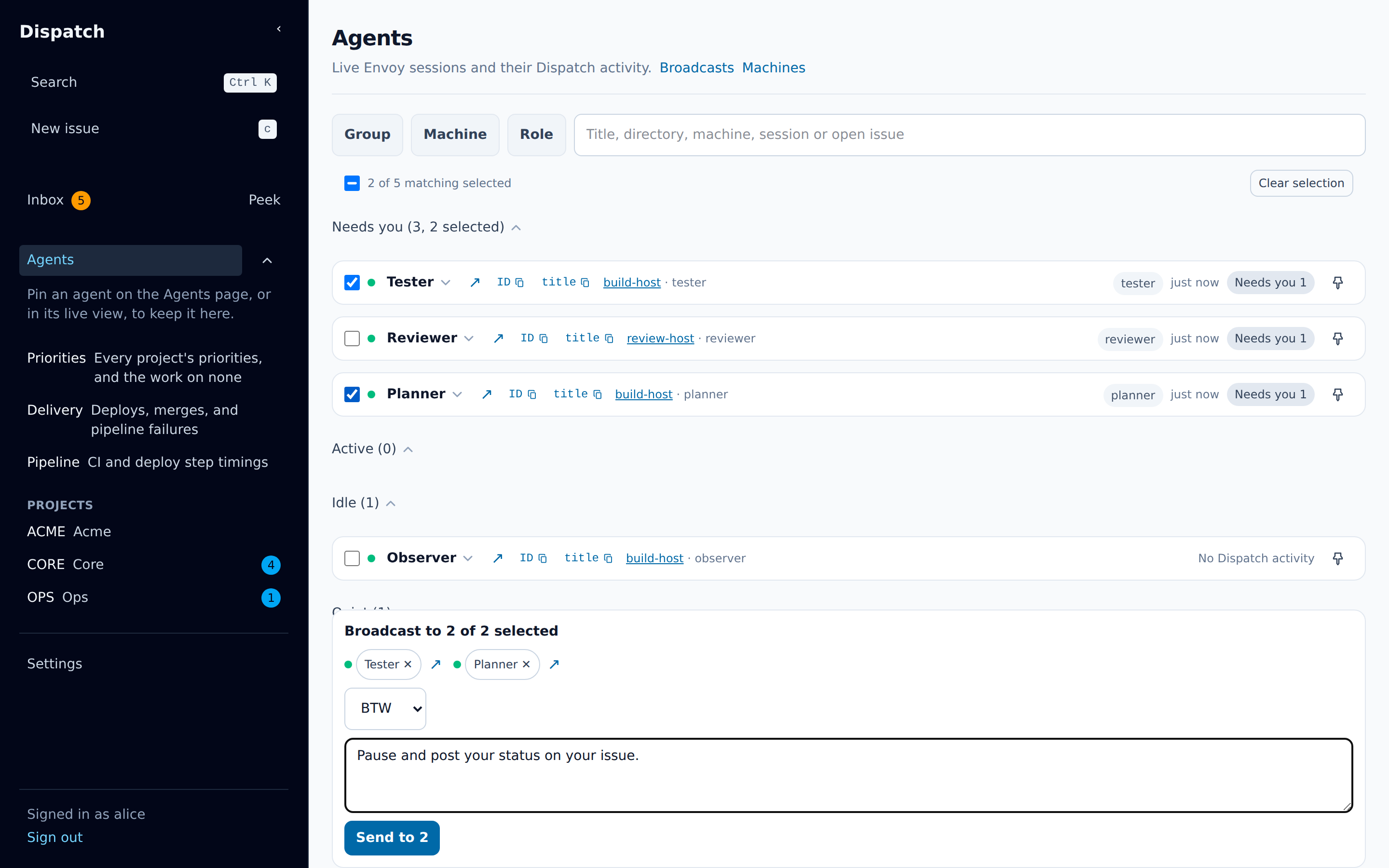
- Tick the checkbox on each agent you want, or press
xon a focused row. The checkbox above the list, Select all matching agents, ticks every agent the filters match, including those in the folded groups. - A broadcast box appears at the bottom of the page. Its heading counts the recipients, for
example
Broadcast to 3 of 4 selected, and each selected agent is a chip you can remove. - Type the message, pick the mode if you want another, and choose Send to N.
Until you pick a mode, a broadcast goes as a BTW, or as an Aside when every agent you selected that takes any mode takes Aside and one of them does not take BTW. The box then says “Sending as Aside” and names that agent. An agent that does not take the mode the broadcast goes in is left out, and its chip says why; once you pick a mode, Dispatch never switches it to another. One broadcast reaches at most 100 agents.
Your selection is what you ticked, not what the filters show. Narrowing the filters after you tick does not drop anyone; the count beside the checkbox says how many selected agents are outside the filter. Clear selection empties it.
Each send gets a row above the broadcast box: Queued, Sending to N…, Sent to N agents, or
Could not send to N with the reason. A queued row, which has not gone out yet, offers
Discard. A failed row offers Retry, which sends the same request again, and Restore
draft, which puts the message and the selection back in the box. Once
Dispatch has made the broadcast, its row says so at once, and then how its delivery stands:
Sent to N agents — delivering to N agents… while recipients are still being reached, then
— delivered, or — not delivered to N when some could not be.
A broadcast is sent the same way as a message to one agent: under one key, tried again until
Dispatch confirms it, so it is made once however many tries reach Dispatch, and kept through a
reload of the tab. Once Dispatch has not confirmed it for 30 seconds, its row says Still sending to N agents — Dispatch has not confirmed it yet. It keeps trying, and the broadcast is made once. and
offers Stop trying. A stopped row says Stopped sending to N agents: with the reason, and
offers Retry, which tries the same request again under the same key, and Restore draft, as
a refused one does. Broadcasts go out in the order you sent them: one still being tried holds back
the ones you send after it, and one refused or stopped does not. A kept broadcast follows the same
two rules a message to one agent does: it comes back for the person who pressed it and for nobody
else, and one reopened more than five minutes later comes back as Not sent: this page was closed before Dispatch confirmed it. with the same note on a Retry within 24 hours, rather than going out on its
own. A recipient Dispatch had not reached when it restarted or was deployed is reached by
Dispatch itself within a few minutes, so every agent gets it exactly once.
After a send, Dispatch opens that broadcast’s page. It lists every recipient, whether the message was delivered, and each reply. A recipient whose delivery failed has a retry. The Broadcasts link at the top of the Agents page lists earlier broadcasts.
Unread replies
Section titled “Unread replies”When an agent replies to a message you sent it, the reply counts as unread. The count shows on the Agents entry in the sidebar, on that agent’s row in the sidebar’s pinned list, and on its row on this page. Opening the row, or the live view you are looking at, marks those replies read, on every device you are signed in on.
When an agent with unread replies disconnects, it moves to a Replied, no longer connected group at the end of the page, so you can still read what it said: its name opens its live view.
The live view
Section titled “The live view”An agent’s name, on its Agents row (↗ beside the title) and everywhere else Dispatch names it,
links to its conversation as it happens, at /agents/<session>/live.
- The header holds a link back to Agents, the session’s name with its running mark, whether this Dispatch is connected to the session’s conversation, and a pin.
- Everything else sits in one row under the message box: Send as, the machine the session runs on, its directory, the model and thinking level, a ring showing how full the session’s context window is, and a ?. On a phone that row scrolls sideways, with the ring and the ? keeping the right edge of the box.
- The ? says what the message box does:
!at the start of a message runs the rest as a shell command in the session;/at the start runs one of the session’s own commands, at the session itself; and the session’s turns are relayed while the page is open and are not stored, while the messages you send through Dispatch and its Dispatch replies are kept. - The ring shows the share of its context window the session’s conversation now fills; choosing it gives the tokens and the window in figures and says what a nearly full window means. From 80 per cent the ring and the share turn amber. The figures move while the session works: after each message of a turn, at the start of a turn, and after a compaction. A session that reports no context window shows no ring.
- The row shows the model and thinking level the session runs now, as Oh My Pi’s own
/modeland/effortreport them, before any turn runs on them. A change made anywhere else (at the session’s terminal, by a/modelor/effortmessage, or a fallback to another model) shows within about 20 seconds. A model name too long for its space truncates, showing the full name on hover. Each assistant turn shows the model that produced it. - Where the session can switch from Dispatch, the model and thinking level are pickers. The model
picker lists every model the session can use, grouped by provider; the thinking picker lists the
levels
/effortoffers for the current model. A pick sends/model <provider/id>or/effort <level>to the session as your own message, always as Send whatever Send as says, and it appears in the conversation under your name, which is the record of who switched and to what. The row changes only when the session reports the new value. With the keyboard, the arrow keys move a picker’s choice without switching anything, and Enter switches to the choice reached; leaving the picker without pressing Enter puts it back on the current value. - Under that row, a line says what happened to your switch:
The session answered: …with the session’s reply as written, such asModel set to anthropic/claude-opus-5.or the reason it refused (Failed to set model: No API key for …). When no answer comes within 30 seconds, or the message could not reach the session, it says no answer came, and the row keeps the values the session last reported; an answer that arrives later replaces that line. No answer does not mean the switch was not applied: if it runs late, the row shows the result. - While a switch waits for its answer, Send is disabled, so your next message from this page reaches the session after the switch. The pickers are held and look disabled: they keep focus, and the arrow keys still move their choice, but nothing switches until the answer comes; then Enter switches to the choice reached. The session’s next turn runs on the picked model. A turn already running when the switch lands finishes on the model it started with, and a prompt that another person, or the session’s terminal, starts between your pick and the answer is outside the page’s control.
- When the row shows less, it says why: “This session does not report its model and thinking
level. Restart it on a newer pi-envoy to show and switch them here.” (it shows the last turn’s
model instead), “This session’s Oh My Pi does not tell Dispatch its model and thinking level.”,
or “This session switches its model and thinking level only at its own terminal.”
A model with no adjustable thinking shows
no adjustable thinking, and a level the model decides showsmodel default. A Claude Code session publishes its model and thinking level, so its header shows them and its pickers work. - The agent’s turns stream in while the page is open. They are relayed, not stored.
- Your messages to the agent, and its replies through Dispatch, are stored and shown in the same thread. A reply through Dispatch is labelled Reply via Dispatch.
- The message box at the bottom sends to the agent.
Send as picks the mode, from the modes the session takes.
When this is Send or Aside and the session publishes a command list, type
/to choose from its commands. The list opens for the/your text cursor sits in, where that/starts the message or follows a space or a line break; a/inside a word, as in a path or a date, opens nothing. Each entry shows the command’s description in full, and the ones only the session’s terminal runs are marked; their reply says they did not run. On a Claude Code session it marks none, because Claude Code does not say which of its commands open a dialog at the terminal. Picking at the start of the message writes the command,/skill:asd-ste100; picking inside a sentence writes the bare name,asd-ste100, since naming a skill to the agent runs nothing. Use the arrow keys to choose, Tab or Enter to pick, and Escape to close the list. BTW offers no commands. - On an Oh My Pi session, a Send or an Aside whose first character is
!runs the rest of the line as a shell command: the shell Oh My Pi resolved, the environment it gives a shell command of its own, and the session’s working directory. A few things differ from typing the same!line into Oh My Pi’s own window. None of your own shell setup runs before your command: no login profile, no~/.bashrc, no fileBASH_ENVorENVnames and no~/.zshenv. So an alias or a function defined in any of them is not found, and none of them prints a banner or changes the directory your command answers from. A zsh still reads the system-wide/etc/zshenv, which nothing can turn off. A repository’s.envrcis not loaded, and Oh My Pi’s ownshellPathsetting does not apply.cdmoves only that one command: each runs in a process of its own, so nothing one command leaves behind reaches the next. The command gets no terminal, and nothing is sent to its standard input. The mark is one!, so!!lsruns!ls, and the agent always reads what a command printed, where Oh My Pi’s own!!keeps it from the agent. A!with nothing after it is no command and reaches the agent as the message it is. What it printed appears in the conversation as your own message, is posted as the reply to your message, and is given to the agent to read at its next turn; it starts no turn. If the session moves to another conversation (/new,/resume) while the command runs, the agent is not given it, so the other conversation never reads output that is not its own. If it moved before the command started, the command is not run at all and the reply says so, so nothing of it runs in the other conversation. One command runs for a session at a time, and a second while one is running is answered naming the command it is waiting on. A command is stopped after two minutes with what it printed kept, and output longer than 8,000 characters is cut, with a line saying so. A BTW runs nothing: the session answers it. - Send works while the agent is in the middle of a turn, and while earlier messages of yours are still on their way or were refused. Each press sends at once, as its own message, and the session takes it as its mode says (Send, Aside, and BTW). Enter sends and Shift+Enter starts a new line. With an empty box, Send cannot be pressed, and the line under the box says “Type a message first.”
- Each message you sent that Dispatch has not made yet shows as its own turn at the end of the thread: Sending…, then, past 30 seconds, Still sending with Stop trying. A refused or stopped one shows the reason with Retry and Discard. Once Dispatch makes it, the stored message takes its place. The agent’s row on the Agents page shows the same turns.
- The live views you open stay open behind you. The one you are looking at is live; the one you left stays live for 30 seconds, in case you come straight back; the rest sleep, holding nothing — no connection to the session, and no conversation drawn. Each keeps the text you have not sent and your place in the conversation, so moving to another agent and back finds both where you left them. Only the view you are looking at names the browser tab and marks the session’s replies read. A sleeping view is dropped altogether unless you pinned its session or left text unsent in it, and opening it again builds it from what the session replays.
A session whose plugin does not stream its conversation shows none of it here. The live view says so, and still shows your messages and their replies.
A Claude Code session in the live view
Section titled “A Claude Code session in the live view”A Claude Code session on Claude Code 2.1.310 or newer streams its conversation here, like any other session: each prompt, the agent’s text as it is written, its thinking where Claude Code keeps it, and each tool call with its arguments and its result, a failed one marked failed. Ten things it shows differently, or cannot show at all:
-
Thinking text at a terminal. A terminal session sends the words the model thought only when its settings have
showThinkingSummaries: true. Without that, the turn’s reasoning reads “Claude Code hides what the model thought here: it sends the thinking text only when the terminal session turns on the showThinkingSummaries setting.” -
The thinking level before the first request. Claude Code reports the level a request ran under, so the header shows a thinking level from the session’s first request on, and none at all for a model that has no effort level.
-
Which commands only the terminal can finish. The
/list cannot mark them, because Claude Code does not say which of its commands open a dialog there. -
A model pick at a terminal. It is stored as the default for new sessions, exactly as
/modeltyped at that terminal is. -
A thinking pick at a terminal. It applies to the session’s own requests from then on, but Claude Code’s
/effortat the terminal still shows the level Claude Code has saved. -
A picture in your message at a terminal. It does not reach the session; Claude Code gives a plugin no way to send one. A session in a Legion pane does get it.
-
The summary of a compaction. It can be missing. Claude Code hides it from a mod on a machine with managed settings, and in one measured
/compactin a terminal session without managed settings it did not reach the mod either. -
A session whose Claude Code cannot load the mod. It shows no conversation and takes no message: its Claude Code is older than 2.1.310, it was started with
--bareor--safe-mode, or its settings turn mods off (disableAllHooks, orallowManagedModsOnlyorallowManagedHooksOnlyin managed settings). -
An image in the conversation. It shows as
[image], as it does for an Oh My Pi session. -
A resumed session. The view holds the conversation since the session’s process started, as an Oh My Pi session’s does. Claude Code hands a mod no row ids for anything before that, so
claude --resumestarts the view empty and it fills from the next turn on.
How Dispatch shows an agent
Section titled “How Dispatch shows an agent”Wherever Dispatch names an agent — who claimed an issue, who asked, who wrote a comment or a message, who replied, who subscribes, a delivery’s recipient, a credential request’s session — it shows the same three things:
- Its name: the session’s current title while it is running, else the title it had when it
wrote, else a short form of its id, such as
session:01a0e090…. A session working for a person adds(for <login>). - Whether it is running: a filled dot when it is running, a ring in amber when it is
unresponsive, a hollow ring when it is not running, and a dashed ring while Dispatch cannot tell
(the list of running sessions has not loaded, or failed to load). The mark reads Envoy’s three
session states, not the agent’s process: a session is
live(it registered within the live window, 5 minutes by default),unresponsive(it last registered longer ago than that but inside the gone horizon, 1 hour by default) orgone(past the horizon, or Envoy holds no record of it). Point at a mark to read its state in words, and, for a running or unresponsive session, when it was last seen. An unresponsive session is not dead: it has a mark of its own rather than the hollow ring, it keeps its claims, and a message you send it waits for it and arrives when it answers again. On this page and in the header of its live view, such a session also says Unresponsive in words beside its name, with the heartbeat it was last seen at, because that is the state a reader has to decide about. - A link to its live view: choose the name. Where the name is itself a button, such as an agent’s row on this page or the asker on an Inbox card, which shows the session’s ID and title to copy, the link is the ↗ beside it.
The page stays current while it is open: Dispatch checks which sessions are running every 15 seconds, so a renamed or stopped agent changes in place, without a reload.
Three places show the name and the dot without a link: the preview card that appears when you
point at a reference, the list of suggestions when you type @ in a message, and the live view’s
own header.
The keyboard shortcuts page lists the Agents page’s keys.